Why GMC Feeds Are the Necessary Backbone of Performance Max Success
Performance Max can only perform as well as the product data powering it. Learn how Google Merchant Center feed quality affects eligibility, matching, segmentation, and ROAS—plus a practical checklist to strengthen your feed for more predictable PMax results.
Why GMC Feeds Are the Necessary Backbone of Performance Max Success
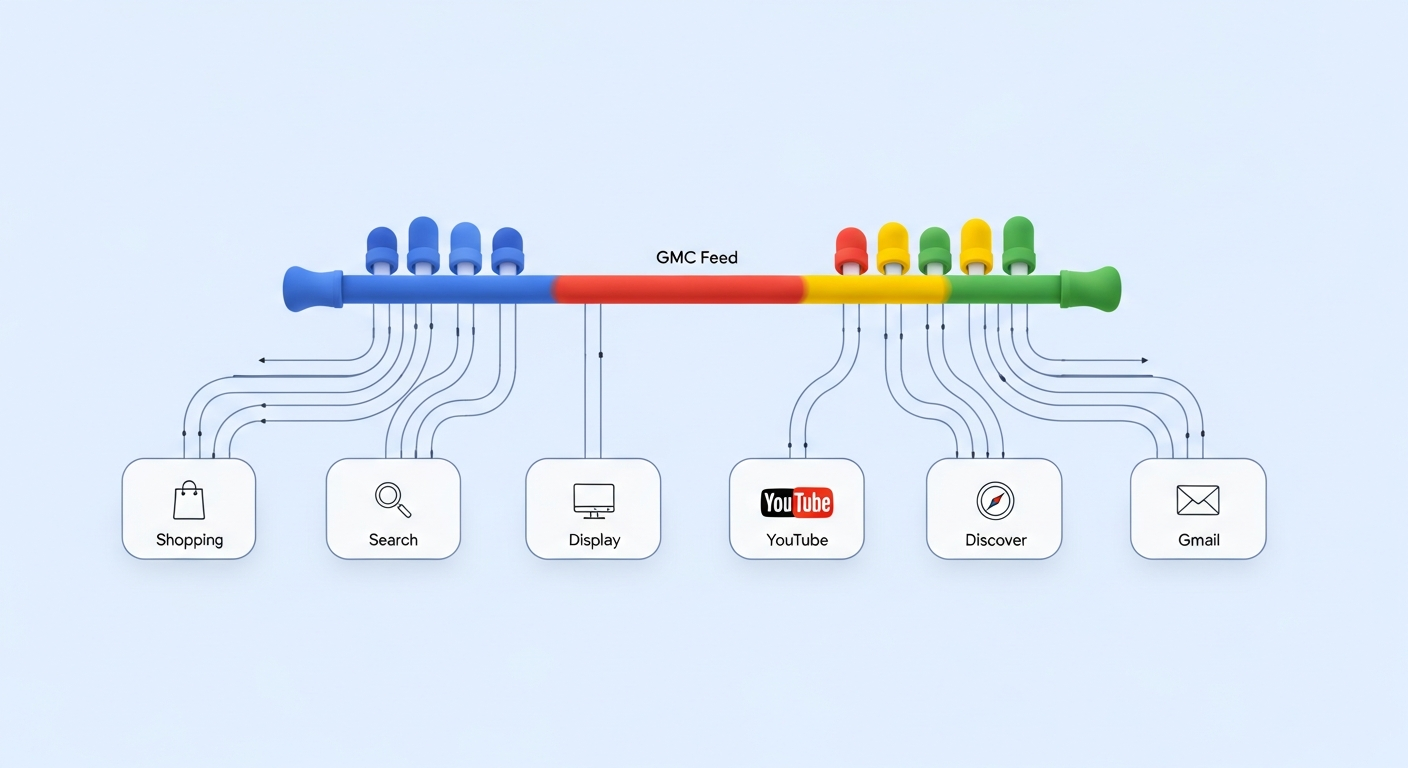
Performance Max can look like a single Google Ads campaign type, but in ecommerce it behaves more like a system. It pulls signals from your website, your account history, your creative, and—most critically—your Google Merchant Center (GMC) product data.
If your GMC feed is incomplete, inconsistent, or out of sync with your site, Performance Max will still spend. It just won’t spend efficiently. A strong feed is the backbone that helps Google understand what you sell, match the right queries, qualify for the best surfaces, and measure outcomes accurately.
How Performance Max actually uses your Merchant Center feed
For retail advertisers, Performance Max uses your Merchant Center feed as the product catalog that powers product selection, eligibility, and much of the ad relevance. Even when you add videos, headlines, and images, the campaign still relies on feed attributes to decide which products to show and when.
At a practical level, your feed influences:
- Eligibility: Whether products are approved, limited, or disapproved (and therefore can’t serve or can only serve in limited contexts).
- Matching: How Google connects search intent to your products via titles, descriptions, GTINs, categories, and other structured signals.
- Ranking and coverage: Which products get exposure, on which networks, and how often (especially when your catalog is large).
- Reporting clarity: Product-level performance and segmentation rely on consistent IDs, variant structure, and pricing/shipping correctness.
When performance dips, many marketers jump straight to creative or bidding changes. Often the real issue is simpler: the feed is leaking relevance, eligibility, or trust signals.
Feed health problems that quietly drain PMax performance
Some feed issues are loud (disapprovals). Others are silent: products are approved but underperform because Google can’t confidently match them to valuable traffic. Here are the most common problems that show up in Performance Max accounts:
1) Weak or generic product titles
A title like "Running Shoes" forces Google to guess. A structured title like "Brand Model Men’s Running Shoe, Size 11, Black" provides immediate relevance. In PMax, titles often do more heavy lifting than marketers expect because they are foundational to query matching.
2) Missing or inconsistent GTIN/MPN
GTINs help Google identify the exact product and compare it across merchants. Missing GTINs can reduce match confidence and limit performance, especially in competitive categories. If you manufacture your own products, consistent MPN + brand becomes even more important.
3) Pricing and availability mismatches
If your feed price differs from your landing page price, you can trigger item-level issues, reduced serving, or disapprovals. Even before you get disapproved, frequent mismatches can lead to limited impressions and shaky performance.
4) Shipping and tax configuration gaps
Incorrect shipping costs (or missing shipping attributes when required) can suppress performance because Google is trying to show a compelling total cost to users. In some markets, misconfiguration can also lead to account warnings.
5) Variant chaos
Variants (size/color) can be a gift or a mess. If variant attributes are incomplete, if IDs change often, or if canonical/variant URLs are inconsistent, you may see fragmented learning and uneven spend distribution across SKUs.
6) Overly broad categories and poor product_type structure
Google product category helps with baseline understanding, while product_type is your custom taxonomy. If both are vague, you lose segmentation power (and often relevance). Clean product_type paths also unlock smarter custom label strategies.
GMC feed optimization checklist for Performance Max
If you want a practical, repeatable way to improve Performance Max, treat feed work like conversion rate optimization: prioritize the highest-impact fixes first, then iterate. Use this checklist to guide your next feed improvement sprint:
- Start with Diagnostics: In Merchant Center, review item issues and account issues. Fix disapprovals first, then warnings, then opportunities.
- Standardize titles: Build a title formula per category (Brand + Product + Key Attribute + Variant). Keep it readable; avoid keyword stuffing.
- Fill identifiers: Add GTIN wherever possible; otherwise ensure brand + MPN are consistent. Don’t invent GTINs.
- Confirm pricing/availability sync: Align feed updates with site updates. If you run frequent promos, ensure sale_price and sale_price_effective_date are reliable.
- Validate shipping signals: Make sure shipping settings reflect reality and match your checkout experience, especially thresholds like free shipping over a certain amount.
- Improve descriptions (selectively): Keep them factual and structured. Include critical specs, compatibility, and what’s in the box where relevant.
- Harden variant data: Ensure size/color/material attributes are accurate. Keep item_group_id stable so Google learns across variants.
- Build custom labels for control: Create labels for margin tiers, seasonality, bestsellers, and inventory status so you can steer PMax decisions with reporting and exclusions.
If you need a workflow to apply rules at scale—like rewriting titles, mapping categories, or fixing missing attributes—use a dedicated feed management layer to automate repetitive work and reduce errors. Tools like Brandlio’s feed optimization platform for Google Merchant Center can help you implement transformations and keep product data consistent as your catalog changes.
Segmentation and control: using custom labels to steer PMax outcomes
One frustration with Performance Max is that it can feel like a black box. Your feed is one of the few places where you can add structured guidance without fighting the algorithm.
Custom labels are particularly powerful because they let you:
- Group products by profitability: e.g., label_0 = "High margin" / "Low margin" so you can monitor ROAS and decide what to exclude.
- Separate seasonal inventory: e.g., label_1 = "Holiday" / "Evergreen" to avoid over-investing in products that will go out of stock.
- Flag hero products: e.g., label_2 = "Top sellers" to ensure your best converters keep getting coverage.
- Track price bands: e.g., label_3 = "$0–$50", "$50–$150", "$150+" to understand where PMax is finding efficient demand.
Then use those labels to create clearer reporting, align with business goals, and apply exclusions or separate campaigns when necessary. Without labels, you end up diagnosing performance SKU-by-SKU, which doesn’t scale.
Troubleshooting: when PMax results drop, check these feed signals first
Performance Max can swing after inventory changes, promo launches, site updates, or feed edits. Before you overhaul budgets or swap bidding strategies, sanity-check the product data inputs that frequently cause sudden dips:
Fast triage questions
- Did a large set of items become limited or disapproved? Check Merchant Center Diagnostics for spikes in issues.
- Did IDs change? If item IDs change (or variants reshuffle), you can reset learning and break historical performance continuity.
- Did pricing change without updated structured data? Mismatch errors often follow theme updates or new promo apps.
- Did shipping settings change? Even subtle edits can affect eligibility and conversion rate due to total cost visibility.
- Are top products out of stock? Availability issues can shift spend to weaker SKUs, making the campaign look "broken" when it’s actually adapting.
Common mistakes to avoid
- Stuffing titles with keywords: This can reduce clarity and hurt conversion rates. Prioritize accuracy and key attributes.
- One-size-fits-all title formulas: Different categories need different attribute priorities (e.g., compatibility for electronics accessories, material for apparel).
- Ignoring warnings: Warnings don’t always stop serving, but they often predict performance ceilings.
- Over-editing too often: Constant changes make it hard to learn what actually improved performance.
For ongoing maintenance, aim for a weekly check of Diagnostics and a monthly feed audit focused on your top-revenue categories. If you want to systematize those fixes—like automatically mapping product_type, enforcing title templates, or filling attributes from your store data—consider a feed rules workflow such as automated GMC feed rules and optimization to keep quality high without manual spreadsheet work.
Conclusion: treat the feed as your performance foundation
Performance Max rewards advertisers who provide clean, complete, and consistent product data. Your creative and bidding matter, but your GMC feed determines eligibility, relevance, and how effectively Google can match your products to high-intent shoppers.
Next steps: audit Merchant Center Diagnostics, standardize titles and identifiers for your top categories, and implement custom labels for business-driven segmentation. Once the foundation is solid, Performance Max optimization becomes dramatically easier—and far more predictable.
Recent Posts


